Weather calendar: Feather Huzzah

The Adafruit Feather range is a very nice set of development boards from the NYC company. They are a good form factor (approx. 5x2cm) and stack using appropriate headers. I particularly like the Feather Huzzah and initially went for these in a big way as they fulfil a number of criteria:

  • they can run MicroPython,
  • the processor boards are wifi-enabled,
  • and some added benefits like lots of additional addons (RTC, OLED, 7-segment displays) plus great tutorials on their web site.

Initial and ongoing experience proved that they were very easy to work with, and they worked as expected. However, the ESP8266 wifi-enabled board does not go into a really low-power mode, consuming about ~70mA normally and the deepsleep mode requires manual intervention. That will most likely mean that I can’t use it longer term for the driver on the display, but it will prove useful as a learning exercise on the way down the power ladder.

Using Arduino IDE

I initially started by loading MicroPython onto the board using the esptool flasher, but ran into an issue that I could not seem to find the correct pinout for the Tx/Rx. Using the ones marked on the board interferes with the USB – serial controller and you see spurious things on the link. So I backed off and re-flashed it with the Arduino IDE and a neat little bit of example clock code which works well, proving that the Tx pin works at least, and the battery powered Feather Huzzah can indeed drive the e-ink display.

img_20161001_182615

MicroPython

However, using micropython proves more difficult, as I cannot seem to find the correct Tx pin for UART 1.  Having flashed the 1.8.4 code level onto it using the instructions I initially tested UART(0), but as this is connected to the USB-serial chip you get all the USB traffic on those pins and so I looked to the write-only UART(1). I could not find which physical pin this was attached to even after trying all the pins one by one.
Weather calendar: ESP8266

The ESP8266 is an incredible little module produced by Expressif. It combines a little processor with a WiFi chip that can act as both a client to an existing wifi network, or as an access point to create its own network. At around $2 it is as “cheap as chips”!

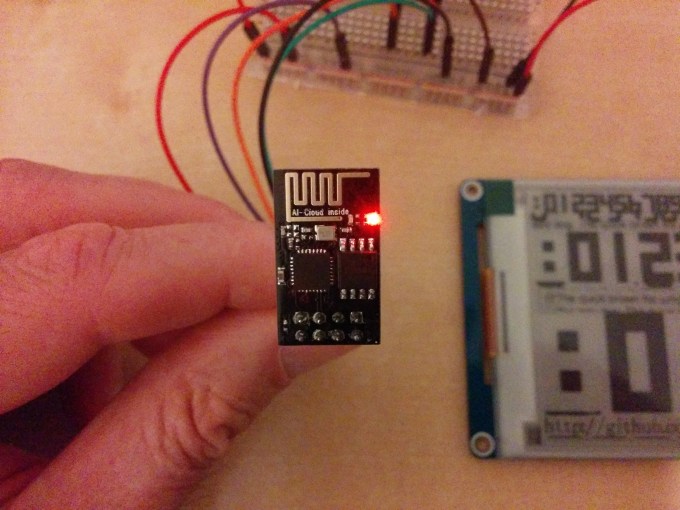
I saw an excellent example of using a variant called the ESP-01 to run a remote e-ink display, along with the code to run this in Python. Whilst it was very attractive and had lots of function, it did not meet some of my earlier requirements of being low-powered as the ESP8266 chips still require about 70mA of current to run. So I could not run a battery powered system on this for long, although the simplicity of the setup surprised me in how easy it was to get the demo program working.

img_20160930_235422

I used a few websites to get started, preferring to connect to the ESP-01 using a CP2102 UART – USB module which I already had (and could set to either 5V or 3.3V – the ESP8266 uses only 3.3V). Once connected using the appropriate bits of wire and remembering that Tx-Rx and Rx-Tx on either board, I then had to set the ESP-01 into station mode, connect to my wifi locally, and start the server. Commands were roughly:

  • AT+GMR, to get the firmware version
  • AT+CWMODE=1
  • AT+CWJAP=”ssid”,”password”
  • AT+CIPMUX=1
  • AT+CIPSERVER=1,3333

… but see the sites referenced to better understand these modem commands and how the embedded server works. I like this chip and I’m going to order a few more just to have if I later want to wifi-enable more projects.

Links


Weather calendar: Pyboard

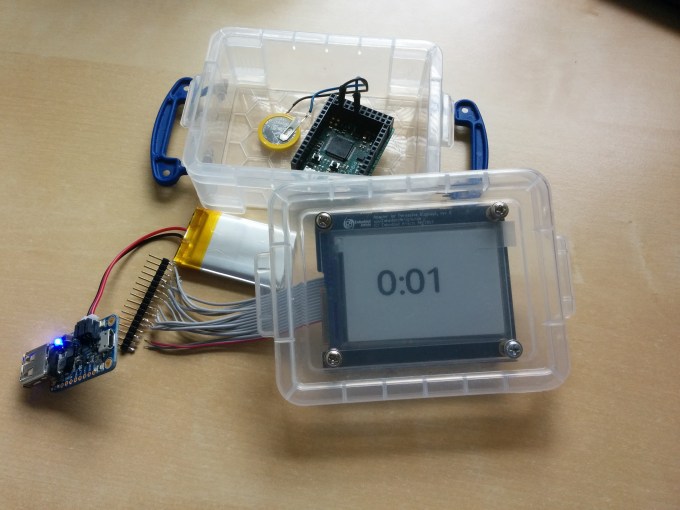
I found it very easy to get the Pervasive Displays e-ink working with the Pyboard once I discovered Peter Hinch’s github library. This not only made the display access easy but also helped with forming the fonts and digits.

img_20160926_151226

The components I used were:

  • LiPo battery, supplies 3.3V and my one is 850maH.
  • small plastic container
  • battery charger from Adafruit
  • Pyboard
  • RTC battery backup in the form of a CR2032 battery.

I also used another of Peter Hinch’s libraries to determine the ‘drift’ of my Real-Time clock on the board I have, and came out with a calibration of -145. Yours may be different, run the tests!

The code was simplicity as once I had set the RTC using the ‘finger’ method of waiting until the seconds changed on my desktop system and sending the command (this is bound to be perhaps 0.5sec wrong, but who cares?) then the battery backup along with the calibration setting should keep it reasonably accurate.

The problems were a couple: the blue light on the battery charger “was very bright” and kept my son awake at night in his room where we tested this clock, and the battery ran out after just a few days. For those who say ‘get a bigger battery’, I actually don’t care what size as the system I want to build should be able to run on a coin battery if needed – I really don’t want to recharge things constantly nor have a large lead-acid car battery sitting under my display.

Code was simplicity itself with just a few lines:

# MicroPython to display digital clock on Embedded Artists e-ink display
# Using epaper library from Peter Hinch
#
# (c) Doug Hall 2016

import time

import epaper

import pyb

a = epaper.Display('L', use_flash=True)
t = time.localtime()
rtc = pyb.RTC()

a.clear_screen()
with a.font('/fc/nunito64x68'):
 a.locate(50, 50)
 a.puts('{:d}:{:02d} '.format(t[3], t[4]))
 a.show()

rtc.wakeup(55000)
pyb.standby()

All in all a good first attempt at writing Python, using an embedded system, and getting an e-ink display running. Downsides were the Pyboard battery consumption, the Pervasive Display itself was a little small (and I ‘cooked’ one with wrong voltage!), and the large ribbon cable connections seemed unwieldy.

On to the next attempt…

Weather calendar, part deux!

Whilst some of my systems have worked, some have not. First up, I have no problem in getting a display on the e-ink displays which I have (a Pervasive Displays, Waveshare) using their demo programs and using either a USB connection or an Arduino.

Arduino

Simplest is the Arduino code and communicating to this via a USB connection, using the Arduino GUI on a Linux machine. This works!

PC

Second easiest is talking to the display directly using a UART connection from a PC, such as the CP2102 chip and driving the display via the USB cable:

  • Using a Python library works well.
  • Using the C code supplied by Waveshare themselves as a library – not tried but I assume it would work like the Python code.

Adafruit Feather Huzzah

  • running MicroPython did not work and gave a memory error
  • running the NodeMCU?

Eventually the memory error helped realised that I may have been approaching it like it was a large system, is there a way I can keep the memory requirements much lower and get the display working? The Huzzah is a good system, although it is a little power-hungry for my liking.

WiPy

Using a WiPy running MicroPython also did not work. I was a little disappointed with this as I think the system is a good one.

Photon

I’ve one of the little Particle.io systems and have played with it, but as the programming was not in Python not taken it further. It could be a possibility but I want to push the MicroPython boards to see if one can handle what I want to accomplish.

Pyboard

I have one of the v1.0 Pyboards from the Kickstarter campaign, and got this working driving the Pervasive Displays display. Mostly because someone else wrote the code and gave a great walkthrough for the wiring and soldering needed.

ESP8266

I’ve ordered a ‘raw’ ESP8266 as one Youtube video shows that working okay as an endpoint, with the Python code running on a backend laptop. I can get one of my small SBCs to do the driving. More on this later…

TXB0108

Logic voltages have changed over the years since the Arduino first came out, and modern chips are largely based around the 3.3V compared with the 5V of the early Arduino systems. Of course this varies and some are 1.8V and so on. I wondered if I were driving the display with the wrong voltage. The Waveshare site claims that the display can handle 3.3-5V okay, although I note that they say you feed it 5V when using their demo program to talk to a PC.

I tried to use a level shifting chip – the TXB0108 – which will either up-shift or down-shift the logic levels on the control lines (and not the voltage! – that I had to realise, so you still must supply 5V somehow). Whilst the results were tantalising, they were inconsistent when only supplying 3.3V to the display as often the updates would not come through and the screen looked ‘broken’.  Feeding 5V worked perfectly. Learning about level-shifting was fun, and may come in handy for later projects, but I’ve assumed that I need a 5v feed to the Waveshare display with 3.3V logic levels on the TX/RX and

Weather calendar

I have been thinking and tinkering around creating a home weather calendar. The background is that we have a variety of hand-held devices such as mobile phones, PCs and tablets as well as a reasonable in-house network, both wired and wireless.  I’ve also a number of local sensors such as weather stations and temperature sensors, and some level of automation with programmable lighting. I’d like to create a weather calendar to display the local weather forecast, plus upcoming calendar entries from our joint shared Google calendars.

Some simple requirements:

  1. High contrast display that can run from battery – LCD or e-ink.
  2. Low-powered system that can run a long time from a battery.
  3. Wifi connected so that I can work on it remotely.
  4. Preferably coded in Python as I am happiest working in that language.
  5. Preferably all local to the display.

To do this I am going to assemble some components:

  • e-ink displays
  • Embedded systems
  • Single-board computers

… of which I have a couple of e-ink displays (Pervasive Displays and Waveshare models), a handful of embedded systems (Pyboard, Photon, Feather Huzzah, WiPy) and any number of SBCs (Raspberry Pi, Beaglebone Black, Odroid, Arduino).

I rejected powering this off a SBC like the Raspberry Pi as the power requirements for those are bad as even the Pi Zero will only run for less than a day with AA batteries! The vast differences between those chips that run a full Linux stack versus the embedded world that have negligible power draw on sleep mode. In addition a lot of those embedded systems are wifi-connected, and wifi itself is power hungry and needs careful sleep modes.


Running Teamspeak on ARM

Teamspeak is a voice chat server which is very popular in the gaming world.  Clans and casual gamers use it to communicate during gameplay, and as it is not tied to one game publisher nor gaming platform (such as Steam, which also has a voice chat feature) so it can be used cross-game and cross-publisher. It is also very easy to set up and create channels, as well as allocate users and blacklist rogue elements or misbehaving players.  In addition you can use it for limited number of players for free – up to 32, beyond that there is a licence model for hosting providers and the like.

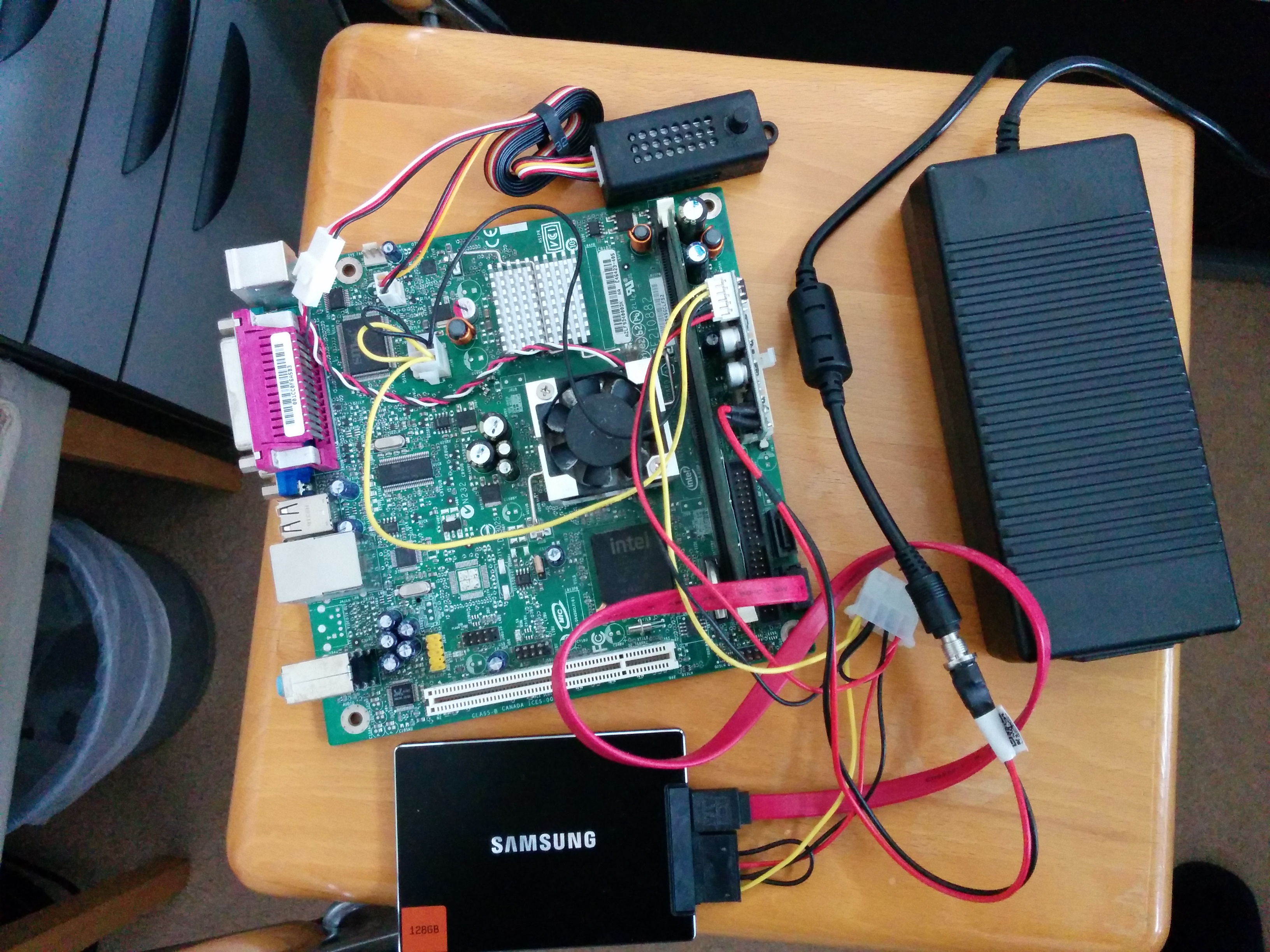
I’d previously run a very small Teamspeak server for my son’s clan on a Atom-based barebones PC, using a mini power supply and a flash hard disk on a SATA connection.  This worked well, but the small CPU hardware fan was annoying until damped down by a speed controller, and the electricity of 20W per day was unnerving, especially if no-one was using the server during the day.  That’s it below, and the mess of wires is just how it works.

redwall IMG_20160404_141846 IMG_20160404_141913

The problem was that Teamspeak only runs on Android/iOS and x86 architectures, there is no compiled binary for ARM architecture and none forthcoming. The endless requests on their forum proved this, and the continual “there are no plans for ARM” didn’t raise any hopes that the company was thinking of compiling their binaries for this platform.  Most single-board computers now are running ARM architecture, even though Intel is good it doesn’t have the cachet with the geek community in this space.

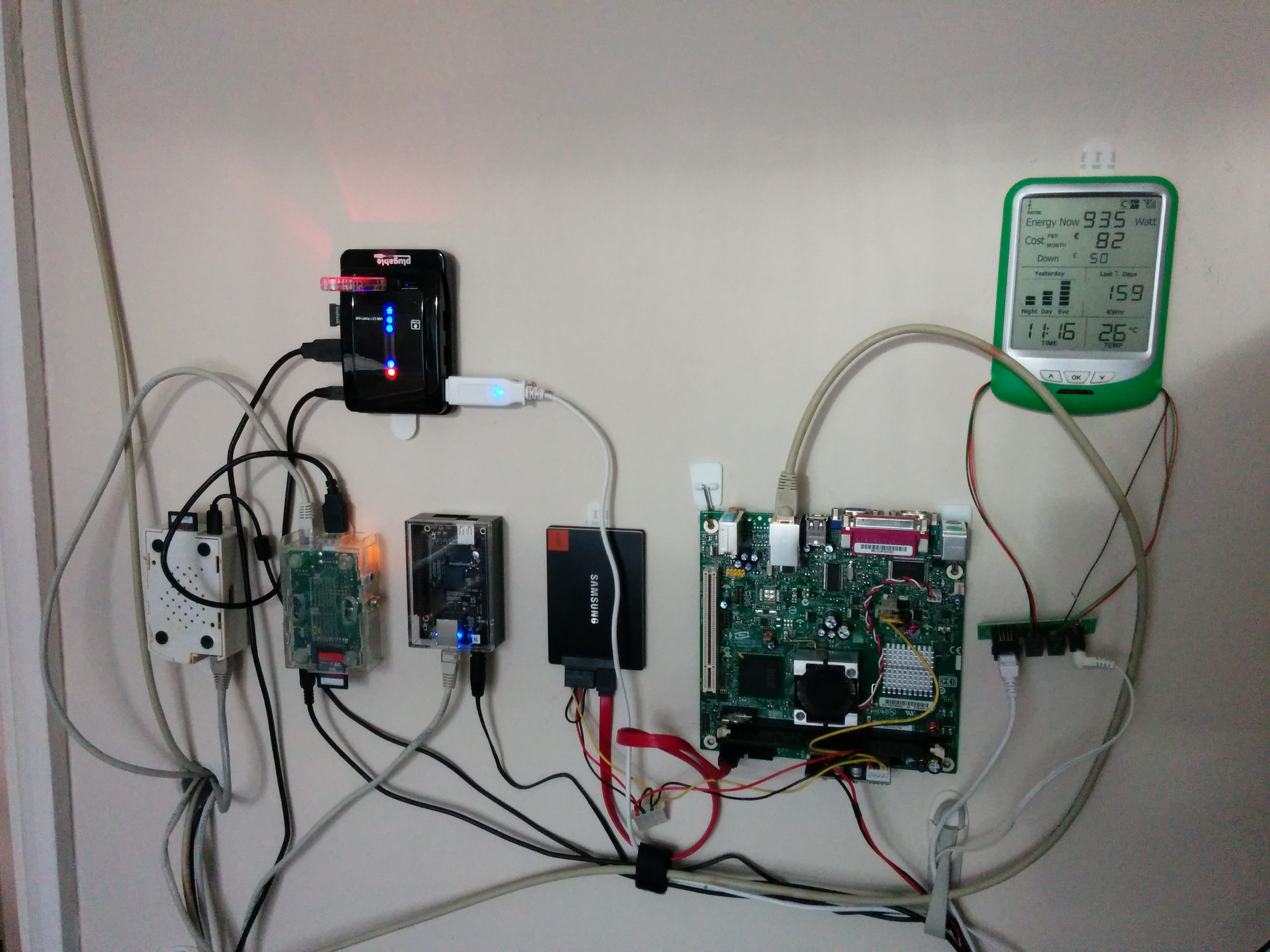
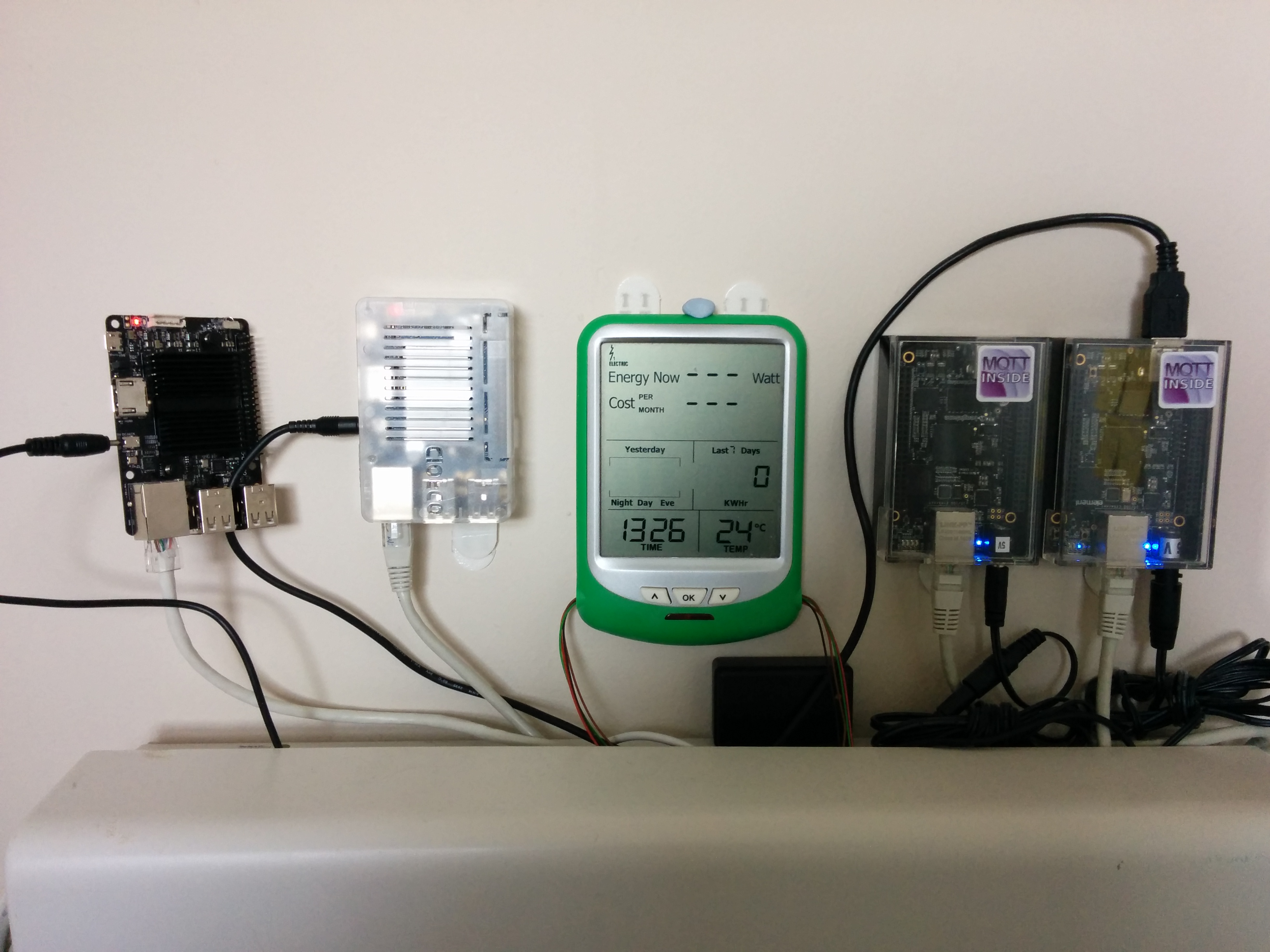
Therefore my wall of Raspberry Pi, Beaglebone Black and Odroid devices wasn’t able to run Teamspeak and I had to have an extra board hanging on the wall with lots of cords.  That was, until I discovered Eltechs – a Russian company who specialise in binary translation layers and whose Exagear Desktop was exactly that: a utility which allowed binaries compiled for x86 to run on ARM architecture devices.  I’ve now installed Exagear Desktop for about £24 on a single licence, and over a late Sunday afternoon’s coding and configuring got it running!  And it runs well!  Now, my wall of SBCs looks much neater and has just two BBB running NodeRED and other house control functions, while the Odroid is taking on the Teamspeak server (Odroid seems to have more capable boards than Raspberry Pi or Beaglebone) which it does without breaking into a sweat on its 4-cores, and then alongside is the newer Odroid C2 with a 64-bit architecture and the latest and greatest Ubuntu 16.04.

The outcome?  Much lower electricity consumption, and a set of always-on servers.

Travel kit just got weird

I used to travel regularly and extensively, until I realised that I just got older and although it was fun, so too was sleeping in my own bed.

One of the techniques I used during that time as a “road worrier” was to keep a list to check off items so as not to forget important things.  Well it so happens that I’ve another trip in my future and decided to dust off the old list to assemble my things.  What a surprise!  Seems like digital archeology isn’t dead and the insight it gave me to previous behaviour (and technology) was insightful.  Take a look:

Shoes 1 1 1
casual Jeans a a
Casual shirt a a
Hat Opt
Shoes 1 1
Jacket a a a
Entertainment Painting Pad a a
Watercolour kit a a
Swimming trunks a a a
goggles a a a
Workshop Marker pens a a a
Camera a a a
Whiteboard Opt Opt Opt
Flip chart paper Opt Opt Opt
Laptop Laptop a a a
Product CDs Opt
Blank CDs Opt Opt
Lock a a a
Charger a a a
Battery a a a
Ethernet cord a a
Telephone cord Opt Opt a

The 3 last columns are for short, medium and long-stay trips (2-3 weeks and so on) and the increasing levels of gear meant that I could quickly take the essentials such as passport without bagging up the baggage.  Traveling light is the best way of travelling and extra stuff is the bane of comfort.  Don’t have it?  Just buy it when you’re there if really needed.

A couple of things stand out – I used to paint for relaxation sitting in some hotel rooms alone.  It was better than watching the TV or reading a book (- too heavy to take enough at the rate I read).  Nowdays, of course, I take an e-reader (not convinced about tablets yet, too heavy and batteries don’t last) but alongside the bulky camera for taking pictures of workshops and process diagrams, there were CDs and telephone cords.  Telephone cords!  Who uses those now?  Everyone uses WiFi in hotels and I haven’t seen a need for ethernet for ages.  Sounds crazy but my kit has just got whole lot lighter and between my smartphone and the Apple MacBook Air I think I can reduce my carry load of 10 years ago by 40%.

Do you have any similar stories?

Mark of the Beast

In the collection of books known commonly as the Bible there is an apocalyptic sci-fi one called “Revelation”, in which a commercial identity device known as “the Mark of the Beast” is necessary for day-to-day existence in buying and selling things. It is described as “being a mark on the hand or forehead”.

The experience of a new smartphone may just be that event.

I recently realised just how important these devices are becoming. My secondary bank (the one where I save up money out of sight from the prime one!) asked me to sign up to a new security device – either a little calculator-type thing with small keypad and locked to my account, or an app on my smartphone. I started down the route with my smartphone and realised when it asked me for yet another long and complicated password that I really didn’t need the ability to generate new direct payees whilst mobile, and it could all wait until I was in front of a better input device, for example my desktop computer at home. So I aborted and went down the ‘little keypad device’ instead of the app.

Now I have to transfer to a new smartphone, and one hour into it I have documented all the reload points for my enterprise services, downloaded all the *.apk files (Android installation files), deleted unnecessary apps, copied the SD card to another computer, and ready to ‘wipe and reset’ after removing the SIM card. It takes planning!

Android helps of course – Google has provided a cloud backup service which increasingly backs up all installed apps and which the app developers can take advantage to back up settings or files, however it is not seamless yet and still requires lots of re-registration and reloading. Enterprise apps are worse as they don’t participate in this Google cloud and all need entry of userids, company registration, and long difficult passwords to set them up. Often the user ids are different which means going back to the original emailed instructions – which may be years old – or finding the new ones in the morass of online information. None of this is easy … and woe betide anyone who gets the sequence of delete/de-register/install/register wrong.

With our devices becoming so critical for identification, identity, access and authentication I can see that building it into the body somehow with facilities to upgrade the core identity section as needed, will become more attractive over time. I just don’t see it happening yet.

I’ve seen the future, and it’s coming right at us

In Vernor Vinge’s book Rainbows End the protagonist awakes after being reanimated in the near future. Having ‘died’ previously with dementia he isn’t well prepared for the future, even if he was a acerbic professor in his previous existence.  Slowly trained in wearable computing and the new ways of earning a living a story is woven around him involving the death of libraries, virtual tribes and distributed knowledge chains. That last neologism is a difficult phrase, but one I struggle to define – the closest may be the idea of the Mechanical Turk from Amazon: very low value pieces of work which can be picked up by workers world-wide and paid for by the requester.

Take a look at Mech Turk and you’ll see that the interface is forbidding and unwelcoming. Gaming the system is common (do a piece of work and the requester rejects it after seeing the result, meaning you don’t get paid and but the requester gets what they wanted) and I guess that workers can do the same by choosing carefully or scraping Wikipedia or whatever. Most mass consumer to consumer services (think eBay) are open to some form of gaming along the way and it is best to take the rough with the smooth when using them – I sold mostly old consumer gear I no longer needed but around 5-10% of all transactions had difficulties.  In some the buyer would insist that I’d not given them everything they expected, in some the seller didn’t send the item until I pointed it out. Reputation systems are used in most of these marketplaces to help the potential buyer to build up a picture of their anonymous seller, but even these are open to gaming at some level.

Somehow we need to invent more liquid ‘means of exchange’ in the digital world. Bitcoin? Kudos? While the idea of working for the reputation may work in the open-source software world, hardly anyone uses it to buy their lunch and generally most open-source software companies charge real money for services. No matter how great my reputation there is no way I can use it to purchase food except for getting someone to buy me a drink at a programmer’s conference. Means of exchange remain fundamental but they don’t have to be oppressive, nor do they need to be dictated by the old establishment. Even bankers were once little boys that grew up and saw how to cash in on something – the challenge is that we learn to do the same in the digital world without getting hampered by strictures imposed by centuries’ old formats invented In Real Life.