Power

“Nearly all men can stand adversity, but if you want to test a man’s character, give him power” – Abe Lincoln.

I once tallied my power sockets distributed around my house at 84 active outlets. That’s a whole lotta power!  Of course my home has far more gadgets than that – more likely closer to 200 things which could reasonably consume power at any one time – but this was the count of active, powered outlets which could deliver power right then.  It may amaze you, or dismay you, or even simply make you say “so what?” but that gives an average of nine outlets per room in my mid-sized English semi-detached house.

Do I really have 9 things in each room which need power?  Is my home occupied at a ratio of almost 10:1 powered things to people?  Counting CPUs it gets crazy as I once estimated that there were over 32 intelligent things in my house, and that was about 5 years ago.  Since then my light bulbs have firmware updates and I don’t even have an internet TV, however everything else seems to have processing power in some way.

I’ve been on a drive to lower the whole cost of this and recently powered down my dual-CPU, dual-core server rack (with added acoustic padding and low-speed fans) as the Minecraft server herein was no longer needed.  It has been replaced by a smaller, more efficient rack of wall-mounted micro systems (of which see below) and I am saving up to replace them and move the NodeRED stuff to Resin.io to use Docker in place of the underlying Debian.  I like the idea of mixed hardware and movement of services across my environment, however don’t think the system services such as NodeRED nor Nginx are decomposed enough yet into micro-services.  Or are they?  Should I check?

Whatever, power demand from my farm has dropped by whopping amounts quarter on quarter and I am aiming to take it down further over the winter months by upgrading domestic appliances where possible, and monitoring and switching off low-power standby things overnight.  We shall see!

Cash is dying

I don’t use cash anymore.

Or at least not so much as I did last year.  Everywhere I travel in the UK I tend to use a card to pay for things.  Although I still hold bills in my cash clip the notes are getting old and tattered as I very rarely use cash.  I’m using contactless (‘NFC’) a whole lot more.

This may be down to a couple of things: I don’t park using on-street meters a lot, the few times I park in a multi-story car park I pay using a card, and the coffee shops I frequent now take contactless payment pretty much everywhere.  In fact, I was so surprised at my local MacDonalds when they didn’t accept contactless for a burger recently that I was tempted to pay using an actual bank note.  My use of notes has receded for another reason: I mostly used them for paying for cab rides in the City but now take the London Underground in preference.

So my personal economy has gone cashless and now with the imminent arrival of Apple Pay into the European market I wonder how soon I will be using my phone instead of a card to pay?  I welcome it as taking multiple items (car keys, wallet, cash clip, mobile phone, laptop) as I travel bothers me and I typically do a ‘pat down’ of my clothes as I exit the office, exit a train, exit my home to check that I have my triumvirate of items.

Why I hate passwords, and so should you

I’m an IT professional with a long and varied career.  I guess that may stand for something when I say that passwords are like belts AND braces: they give a feeling of security and familiarity, but don’t add anything to the overall function of the system.  Perhaps you have a better analogy?

I’ve just gone through the routine of password changing for my employer and this is mandated every 90 days (due to some arcane European law) with attendant rules such as “must be eight characters or more” and including upper, lower case with special characters.  Now, that last piece was my undoing today.

I agree with the whole ‘complexity equals security’ thing to some degree but I have at least ten places that I regularly sign into for my work (corporate websites, email client, laptop, file sharing) and I like to keep them in sync – one day’s pain is enough without contemplating different passwords for each.  So I take a couple of hours each quarter and hit the buttons, working my way through a list of sites and technologies.  I do it in a particular order too – change my BYOD MDM before changing the underlying mobile email client’s so that I don’t time out my access via too many ‘sync’ events while working through the list.  It feels a little like standing on one leg while whistling Dixie.

And that’s the thing.  I’m very hardened to computing technology’s ability to impose stringent rules and logically do the illogical.  I once lost hundreds of hours of typing on a computer program I’d written while doing my degree, all down to a single press of the wrong button.  Ever since I’ve held no awe for computing’s infallibility, and today revealed another step on the downwards spiral.  For today I chose a special character for my password which represents a currency symbol – pounds, dollars or whatnot.  Most of the password systems accepted it but as I reached mid-point through the list one rejected it.  With a sigh I substituted another character but then the next rejected that also, leaving me now with THREE different variations of password and no way back.

In case you think I should just change them all to something else – my corporate systems at one point mandate that passwords should not be changed more than once per day, so no, that’s no solution also.  Until tomorrow…

We seriously need to rethink this computing paradigm.

Nesting in the wires

I just upgraded my Macbook Air to OS X Yosemite.  But never mind about that; I realise that I’ve started building a bird’s nest of wires.

redwall

Recently I’ve become enamoured of a couple of things.  The first is saving money and especially that money which ‘leaks’ from my family budget through slow, grumbling month-on-month charges like electricity.  I measured my large 4U server with dual-core, dual-Opteron motherboard and it was chomping 183W every hour of every day.  As it was a £10 purchase off eBay the motherboard was a good buy but at my local electricity supplier’s rates that was costing me approximately £17 per month.  Too much!

So I started a drive to move services such as my web server and gaming software off it onto something lower powered.

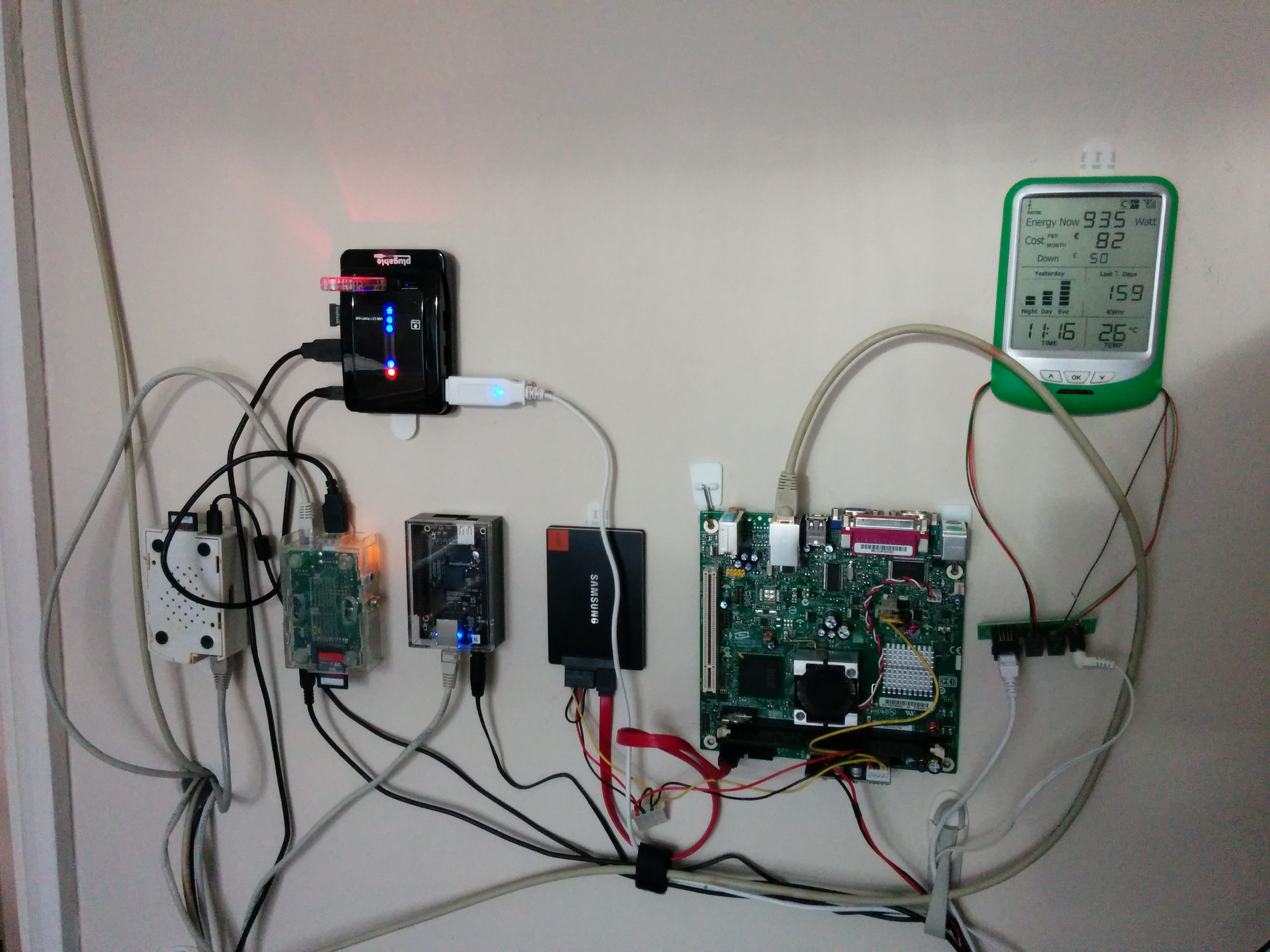
I fell in love with small form factor PCs such as the Raspberry Pi and Beaglebone Black.  They are truly astonishing and I have a wonderful collection of them on my wall, festooned with power cables and wires which keep them fed.  Take for example the Raspberry Pi – it draws just 250 milliamps when under light workload.  The Beaglebone Black (of which I am highly impressed) draws just over 300.  In terms of power usage that is much better than the large server hardware underneath them.  Of course they are less capable machines and do less – however for what they do that does not matter.  If you think of computers in terms of four main measures of CPU, memory, storage and network then not all computers need everything big.  Something like my little Raspberry Pi for example, let’s call him “hugo”, only need to monitor signals from the variety of devices I’ve scattered around my house and environment to measure things such as light levels.  Hugo then passes things off to another small computer – let’s call her “jess” – who then determines if house lights should be switched off or on.

Much more satisfying than having a great clunking computer doing all this is a little farm of smaller devices which share out the work.  Each can be specialised to do their job well, an added advantage is that they can be turned off independently and worked on without affecting what the others are doing.

I love my micro-PCs!

The flipside of too much security

I just typed my password into a google search.

That was accidental; I run a multitude of different operating systems across a number of different hardware and virtual platforms.  Some of the places I’m required to enter passwords save them securely for me (for example, my corporate VPN client), others I use a password manager in the browser.  But sometimes I still have to enter them manually.

I like my bank – it uses _parts_ of my password so I never inadvertently type it anywhere.  However this entering of my password in Google happened because of a couple of things: being eternally vigilante throughout the day does not equate to having to enter a password multiple times, and screen blanking versus screen locking.  In the case in question one of my laptops went blank screen to powersave, I then started typing my unlock password (which is mandated changed every 90 days) and pressed enter, only to find that the screen had blanked but not locked.  Of course I can alter this so that when it blanks it also locks, but my point is that constantly entering passwords is counterproductive and some sort of presence (RFID? geo-fencing?) is more applicable than the simple you-have-not-touched-the-keyboard time out, and is probably better for security control.

And don’t get me on to the mis-handled SSO tokens, constant re-entry of passwords throughout the day as I use corporate internal websites!

Petri nets, state machines, decision tables and light switches

I’ve been running a set for my home lighting for some time now using a combination of smart lighting (Lifx bulbs), Node RED from the IBM labs, and a set of sensors and time schedules.  This has enabled me to do some surprising things like

  1. Turning on my son’s lights early in the morning using a ‘rising sun’ sequence – earlier on college days, later on weekends.
  2. Enforcing a lights out! at a reasonable time during college term times, while leaving the lights on Friday/Saturday nights.
  3. Drifting colours of the bulbs through a bright white the first part of the day, into a more yellow or orange glow into the evening and later part of the night.
  4. Gradually dimming the halls lights into before the lights out! command during the working week.

Other than the annoyance it provokes in my offspring it has all be rather unreliable – mainly because the API by which I call the smart bulbs is written in a language which needs special support, and not easily integrated into my standard computer setup of diverse embedded or micro-computer hardware.  I’ve also a larger, more capable server which runs Linux and could do a whole lot of this but I wish to turn it into a power-down mode when it is not being used by my son’s gaming clan, thus saving some of the considerable electricity it consumes throughout the month.

My Node RED flows look like these:
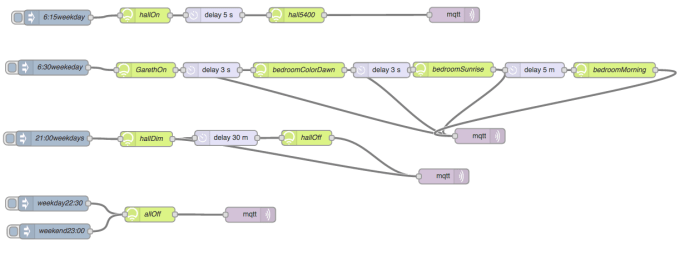
Screen Shot 2014-09-08 at 13.00.10


So, a little complicated!

The real issue is that I need several different events to all A long way back I did some work around artificial intelligence and rules engines, so when my wiring diagram above started to get difficult I looked further afield into rules – most of which use something called a ‘rete engine’ for forward or backwards chaining rule invocations.  Whilst that is fine and dandy it takes lots of programming and understanding either the domain-specific rule language of the particular engine, else the programming language and constructs in which the engine is written.   None of that is trivial, unlike the wiring diagram above.  The issue becomes when you try to visualise complex conditions – wiring no longer gives that and we need to look wider afield.

The net comes to the rescue of course.  I’d seen decision tables as being close to where I needed to be.  Those look somewhat like this (from Wikipedia):

The four quadrants
Conditions Condition alternatives
Actions Action entries


… or a good example (also from Wikipedia).  The following is a balanced decision table (created by Systems Made Simple).

Printer troubleshooter
Rules
Conditions Printer does not print Y Y Y Y N N N N
A red light is flashing Y Y N N Y Y N N
Printer is unrecognized Y N Y N Y N Y N
Actions Check the power cable X
Check the printer-computer cable X X
Ensure printer software is installed X X X X
Check/replace ink X X X X
Check for paper jam X X

There was some discussion on the Google groups which are used by NodeRED to discuss product features or issues.  Here’s the link https://groups.google.com/forum/#!forum/node-red    Amongst other topics one was  for a couple of enhancements and mentioned Petri nets.  I’m not familiar with those and needed to look up what they did, and it seems that their use is similar to what I need for my smart lights.  Here’s the discussion https://groups.google.com/forum/#!topic/node-red/K7yQFxG07u0

Underlying it all is the concept of state machines, of which I am somewhat familiar having seen these in the world of Business Process Management or BMP.  These are good for taking many inputs and either coming to s definite, simple conclusion (either deterministic or non-deterministic finite state machines) but the issue then becomes displaying them visually.  Normally the connecting line between states is used to determine the transition but NodeRED uses it to depict data and control flow.

What I’d like is a simple way of combining multiple inputs into a single decision; at this point I’m uncertain if Rete engines, state machines, Petri nets or decision tables are the simplest to depict visually.

 

Mark of the Beast

In the collection of books known commonly as the Bible there is an apocalyptic sci-fi one called “Revelation”, in which a commercial identity device known as “the Mark of the Beast” is necessary for day-to-day existence in buying and selling things. It is described as “being a mark on the hand or forehead”.

The experience of a new smartphone may just be that event.

I recently realised just how important these devices are becoming. My secondary bank (the one where I save up money out of sight from the prime one!) asked me to sign up to a new security device – either a little calculator-type thing with small keypad and locked to my account, or an app on my smartphone. I started down the route with my smartphone and realised when it asked me for yet another long and complicated password that I really didn’t need the ability to generate new direct payees whilst mobile, and it could all wait until I was in front of a better input device, for example my desktop computer at home. So I aborted and went down the ‘little keypad device’ instead of the app.

Now I have to transfer to a new smartphone, and one hour into it I have documented all the reload points for my enterprise services, downloaded all the *.apk files (Android installation files), deleted unnecessary apps, copied the SD card to another computer, and ready to ‘wipe and reset’ after removing the SIM card. It takes planning!

Android helps of course – Google has provided a cloud backup service which increasingly backs up all installed apps and which the app developers can take advantage to back up settings or files, however it is not seamless yet and still requires lots of re-registration and reloading. Enterprise apps are worse as they don’t participate in this Google cloud and all need entry of userids, company registration, and long difficult passwords to set them up. Often the user ids are different which means going back to the original emailed instructions – which may be years old – or finding the new ones in the morass of online information. None of this is easy … and woe betide anyone who gets the sequence of delete/de-register/install/register wrong.

With our devices becoming so critical for identification, identity, access and authentication I can see that building it into the body somehow with facilities to upgrade the core identity section as needed, will become more attractive over time. I just don’t see it happening yet.

Rethinking the love affair between lights and switches

Bonnie … and Clyde.  

Hanzel … and Gretel.  

Lights … and switches.

Why do we have switches?  Think about it – what is a switch without a light? Nothing.  What is a light without a switch?  Something.  A light by itself is still useful (like a clock which is broken, it tells the correct time once per day), the only downside is that you cannot turn it off, or on.  But at least it is a light and still serves its main purpose.  What happens if we break that link between switch and light?  What happens if we rethink the gift that Edison bestowed upon us?  What if the light could be the switch and somehow know when and what to do?

I purchased some Lifx bulbs recently, and have had a really good experience in setting them up and using them from the smartphone app.  I previously used LiightwaveRF sockets and switches, but somehow they didn’t seem to satisfy what I was looking for.  I think one of the reasons is that the Lightwave system makes the switch intelligent rather than the other way around, so in the marriage of switch+light both parts of the pairing have to remain, whereas the Lifx system makes the light intelligent and makes the switch redundant.  So the divorce can be complete, and lights can stand alone without the limitations of switches.

Am I making too much of this?

We all assumed that houses should have telephone numbers, and dutifully called a house and sub-addressed the occupants of that house.  Nowdays of course we call people, and discard the need for sub-addressing the responder to the call with the assumption that if we’d wanted someone else, then we would have called their phone number instead.  So it goes.

Do we assume the same thing with lights+switches?  Do we assume that one needs the other simply because, well, they always have?  What happens when the light becomes intelligent and does what we want (switches off, changes colour, turns on at certain times, dims) without the use of a switch?  I think this liberates lights to become really, really useful.  For example, I am wiring up NodeRED, the Node.js module ‘suncalc’, Lifx bulbs all in my WiFi router and Raspberry Pi so that my lights switch on the in mornings, change to bright cool light (colour team 6500K), then change to warmer lighting in the evenings (3000K) and dim before bedtime.  A lot of this is due to colour and circadian biorythyms which mean that we expect morning light to be cooler, and evening light to be warmer (essentially bluer in mornings and yellow in evenings).  It actually works really well and the house feels a lot more ‘natural’, whatever that means!

I love this setup so much that I’ve purchased 6 Lifx bulbs, and mean to purchase another 10 GU10s to fit in my main living space.  Now I’m looking for a trigger system such as a multi-button keyfob to replace all the light switches in rooms where I’ve placed Lifx so to trigger ‘events’ such as going to sleep, leaving the room and the like.  I wonder if systems of independent motion detectors as well could provide similar intelligence to really make my system act as a whole?

Blocking unknown callers on mobile phone

Want to block ambulance-chasing lawyers?  Friends you don’t like anymore?  Random strangers?

Normally blocking incoming callers on the Android platform is easy: register their number as a contact, then select ‘block this caller’ from their contact entry.  However calls where caller-id is withheld or not known don’t have the equivalent under Android unless you use an app, and those apps would normally ask to have access to all your contacts and their details – surely a privacy warning!

I was randomly set upon by some law firms who wished me to claim personal injury for a no-fault accident in my car.  The fact that I was stationary at the time and received no injury didn’t deter them, so I looked for another way of doing this.  Google is your friend, of course and somewhere on the internet this little gem appeared.  Almost all the calls have dropped to zero now, along with blocking them on my home telephone line using a powerful wifi router from AVM, and by migrating my phone line physically to a VOIP system which allows greater control (- and that was done before the calls started, for cost reasons).

The easy answer is to create a entry in your Google userid contacts, the same one which you sign in on your telephone, with a list of phone numbers in text such as ‘Unknown’, ‘(Unknown)’, or ‘Private number’.  The reason for doing it off the phone is that the phone person app, which edits your contacts, does not allow text numbers, only numeric numbers.  This may vary of course by hardware – but the offline editing works for them all.  Now when your Google id is synced to your phone it will have a new entry with those numbers, and you can then edit them and select to block the caller.  Simples!